Fewer failed deliveries
Catch “near the mosque” addresses at checkout, then get a GPS pin or National Short Address from the buyer before the courier leaves.
For Shopify stores shipping in the Gulf
Verify GCC addresses at checkout, guard Cash on Delivery and get exact delivery pins from buyers.

Catch “near the mosque” addresses at checkout, then get a GPS pin or National Short Address from the buyer before the courier leaves.
Turn Cash on Delivery off for countries, order values or PO Box addresses where refusals cost you most.
On Pro the location is written into the shipping address itself, so any courier integration that prints the second address line picks it up with no extra setup.
GCC Pin works at checkout, right after the order and on the courier label.
Shopify Functions check the Saudi National Short Address, Makani or building number and the local mobile number, in Arabic and English. Soft mode only tags the order; Block mode asks the buyer to fix it. Cash on Delivery is hidden where it is risky.
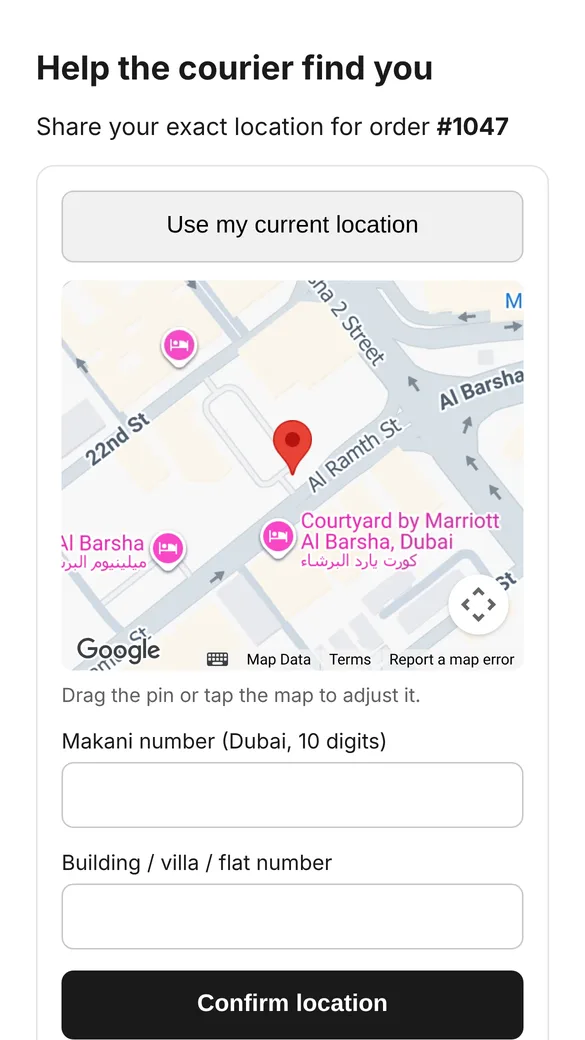
The thank-you page shows a block that opens a mobile pin page. The buyer taps “Use my current location”, drags the pin or types a short address. You can also send the link by email, SMS or WhatsApp.
The location is added to the order note, attributes and a metafield. On Pro it goes into the second address line so every courier label carries it, and the order can wait on hold until the pin arrives.
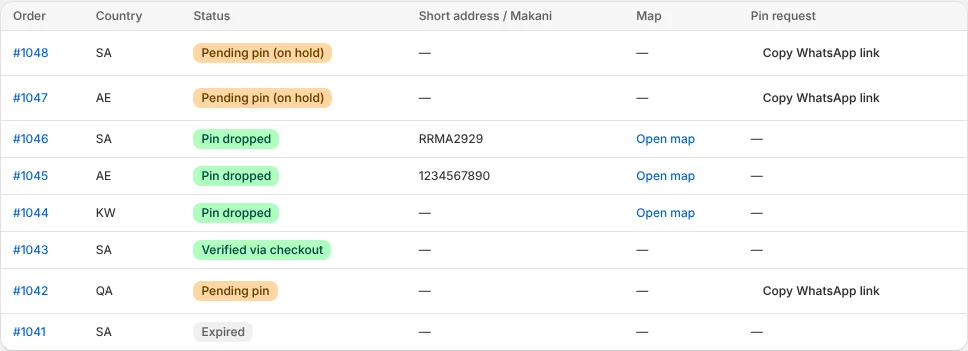
See which orders are waiting for a location and which came back with a pin or short address, and copy a WhatsApp link for buyers who have not answered yet. The month's results sit at the top: orders checked, vague addresses caught and locations added.
Start free. Upgrade when your GCC orders grow.
$0 / month
30 GCC orders a month
$14.99 / month
14-day free trial
300 GCC orders a month
$29.99 / month
14-day free trial
1,000 GCC orders a month, then $0.04 per order (capped at $200 a month)
Only if you choose Block mode. Soft mode, the default, never blocks checkout. It only tags orders whose address needs more detail.
Saudi Arabia, the United Arab Emirates, Kuwait, Qatar, Bahrain and Oman. You choose the rules per country.
After paying, the buyer sees a block on the thank-you and order status pages. It opens a mobile page where they tap “Use my current location”, drag a pin, or type a Saudi National Short Address, Makani number or building number. You can also send the link by email, SMS or WhatsApp.
Yes. On Pro the app writes the location into the order's second address line, which every courier integration prints on the label. On all plans it is also added to the order note, order attributes and a metafield.
The order keeps the “needs pin” tag. If you use fulfillment holds (Pro), the hold is released automatically after the time you choose (24 hours by default), so no order is stuck.
No. Checkout validation and the COD guard run as Shopify Functions, which App Store apps can use on every Shopify plan, and the thank-you block is added in the standard checkout editor.
Only what is needed to deliver: the order number, country, original second address line and the location the buyer shares. It is deleted after 90 days, or sooner when Shopify sends a deletion request. See our privacy policy.
Yes. It follows the buyer's browser language and supports right-to-left layout.
Install GCC Pin from the Shopify App Store and start on the free plan. A setup guide in your Shopify admin walks you through each step.
Add to Shopify